One Clean Launcher For All Your PC Games.
Astraxis combines your entire game library across Steam, Epic Games, Xbox, and GOG into one lightning-fast dashboard. It flushes standby RAM before you launch for maximum FPS, and levels up a 100% free Battle Pass while you play.
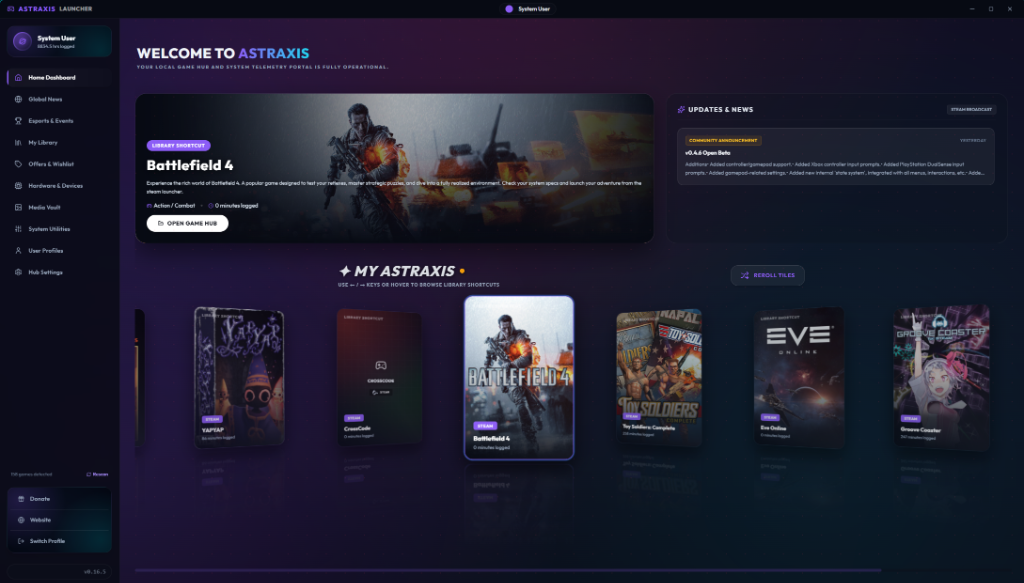
How Astraxis Works
Get your entire PC gaming library organized into one clean, unified launcher.
Auto-Detect Installed Games
Open Astraxis and it automatically detects your installed games across Steam, Epic, Xbox Game Pass, and GOG.
One Clean Master Library
Say goodbye to opening multiple heavy store apps. All your titles sit in one lightning-fast grid with high-resolution 4K box art and zero ads.
Click Play, Boost & Level Up
Launch any game with 1 click. Astraxis flushes standby RAM before boot to maximize FPS, while automatically tracking your playtime for free Battle Pass rewards.
Built for Pure Gaming Performance
Engineered from scratch to replace bloated store clients with raw speed, instant game detection, and stutter-free gaming.
Universal Game Scanner
Auto-detects every game you own across Steam, Epic, Xbox Game Pass, GOG, EA, Ubisoft, Battle.net, and standalone folders directly on your PC.
Automatic Card Art & Banners
Pulls crystal-clear vertical box art, cinematic hero banners, developer logos, and official Metacritic ratings automatically—no broken placeholder images.
Running Game Matcher
Searches and locks onto your active game binary automatically—even from desktop shortcuts or mod managers—ensuring 100% playtime accuracy.
Smart Tool Separation
Wallpaper Engine, Discord, and OBS will never corrupt your gaming hours or inflate your Battle Pass XP. Astraxis keeps utility software separate.
Rig Compatibility (0–100 Score)
Instantly grades your GPU, CPU, and RAM against game requirements before you download or launch, complete with actionable graphics optimization tips.
1-Click Game Mode & RAM Purge
Flushes Windows standby memory cache before game boot to eliminate micro-stutters, auto-switches to Ultimate Performance power plan, and minimizes background memory overhead.
Designed for Modern PC Gamers
Take a tour through Astraxis Launcher's key views and modules.
Intelligent Game Hub & Live Session Engine
Each game gets a personalized command center. View detailed session logs, franchise timelines, and community media with zero background tool interference.
- Live Windows Process Picker with PID & RAM footprint retargeting
- Live Session Engine with tool separation (v0.51.500)
- Power tuning hooks & Standby RAM GC Purge before launch
- Franchise timeline chronologies with prequel/sequel trees
Universal Multi-Platform Library Matrix
Aggregate Steam, Epic Games, GOG Galaxy, EA Desktop, Ubisoft Connect, Xbox App, Battle.net, and DRM-free standalone games in one fluid grid with 5-tier card art crawling.
- 5-tier card art pipeline with SteamGridDB & 404 fallbacks
- Steam Store API details ingestion & HTML description sanitizer
- Instant search, clear filter button, and density card resizing
- Custom folder scanning and favorite game shortcuts
Hardware Telemetry & 0-100 Optimization
Monitor system metrics and benchmark your rig without third-party overlay bloat. Astraxis evaluates RAM and GPU hardware tiers directly against official PC requirements.
- 0-100 Hardware Optimization Scoring Engine with dynamic tips
- PowerShell Standby RAM Garbage Collection Purge before boot
- Automated Windows High Performance power scheme switching
- Real-time CPU core utilization and GPU thermal monitoring
Integrated Esports Arena & Clean RSS Feeds
Catch live gaming news RSS streams, official Astraxis release changelogs, tournament schedules for CS2, Valorant, Dota 2, and Rocket League, plus instant game deal aggregators.
- 100% native RSS feed parser with zero advertising trackers
- Official Astraxis release notes & client changelog feed
- Live game deals with historical low price detection
- Tournament schedules, circuit standings & desktop match alerts
4 Dashboard Layouts & 50-Tier Battle Pass
Your playtime matters. Level up your profile by logging hours in your favorite games to unlock 4 distinct dashboard layouts, custom RGB slider locks, and mythic titles.
- 4 Unlockable Dashboards: Standard, Streamer Dock, Cyberpunk, Arcade
- 50 Battle Pass progression tiers driven by exponential playtime XP
- Live Session Telemetry Mini-HUD with stopwatch timer
- Custom RGB color sliders, holographic borders & mythic titles
Built Different Than Bloated Game Stores
Comparison of Astraxis Launcher against standard web-embedded store clients.
| Feature | Astraxis Launcher | Generic Game Store Clients |
|---|---|---|
| Background RAM Footprint | Low (~120 MB idle) | High (500 MB - 1.2 GB) |
| Multi-Store Scanning | ✓ Steam, Epic, GOG, EA, Ubisoft, Xbox | ✗ Store locked only |
| Process Executable Retargeting | ✓ Live Windows Process Picker | ✗ None |
| Hardware Telemetry & Game Mode | ✓ CPU/GPU/RAM Stats & Auto Power Schemes | ✗ None |
| Ad Tracking & Telemetry Analytics | ✓ Zero Trackers (100% Privacy) | ✗ Heavy Ad & Behavior Tracking |
| Profile Battle Pass & Leveling | ✓ 50 Playtime Progression Tiers | ✗ None |
Is Your PC Battle Ready?
Check the system requirements below to verify if your computer qualifies for Astraxis's performance optimizer hooks.